What is exactly BlogR
A multilingual blog engine + visual CMS page builder — purpose-built for Laravel & FilamentPHP v4.
BlogR transforms your Laravel application into a complete publishing platform. It combines a translation-first blog engine, a drag-and-free CMS page builder with 23 block types, enterprise-grade SEO, WCAG 2.2 AA accessibility, and a theming system with light/dark mode — all configurable from a single admin settings panel with over 85 fields.
And yes, everything is fully multilingual from the ground up.
The Problem
Building a multilingual blog or CMS in Laravel usually means cobbling together:
- A blog package that doesn't support translations
- A separate CMS package with a different UI paradigm
- A translation plugin bolted on as an afterthought
- Separate SEO, analytics, and theme management
You end up with five dependencies fighting each other, inconsistent admin UIs, and a database schema that makes you cry during migrations.
The Solution
BlogR is one package, one admin UI, one consistent architecture. It ships as a FilamentPHP v4 plugin — which means it integrates directly into your existing admin panel with zero UI friction.
One composer require installs: a blog engine, a CMS, a translation system, SEO, analytics, themes, dashboard widgets, import/export, and a plugin architecture.
Built for FilamentPHP v4
BlogR is not a standalone package with a Filament wrapper — it's a native Filament plugin written against Filament's Schema (not Forms), navigation system, widgets, and panel configuration.
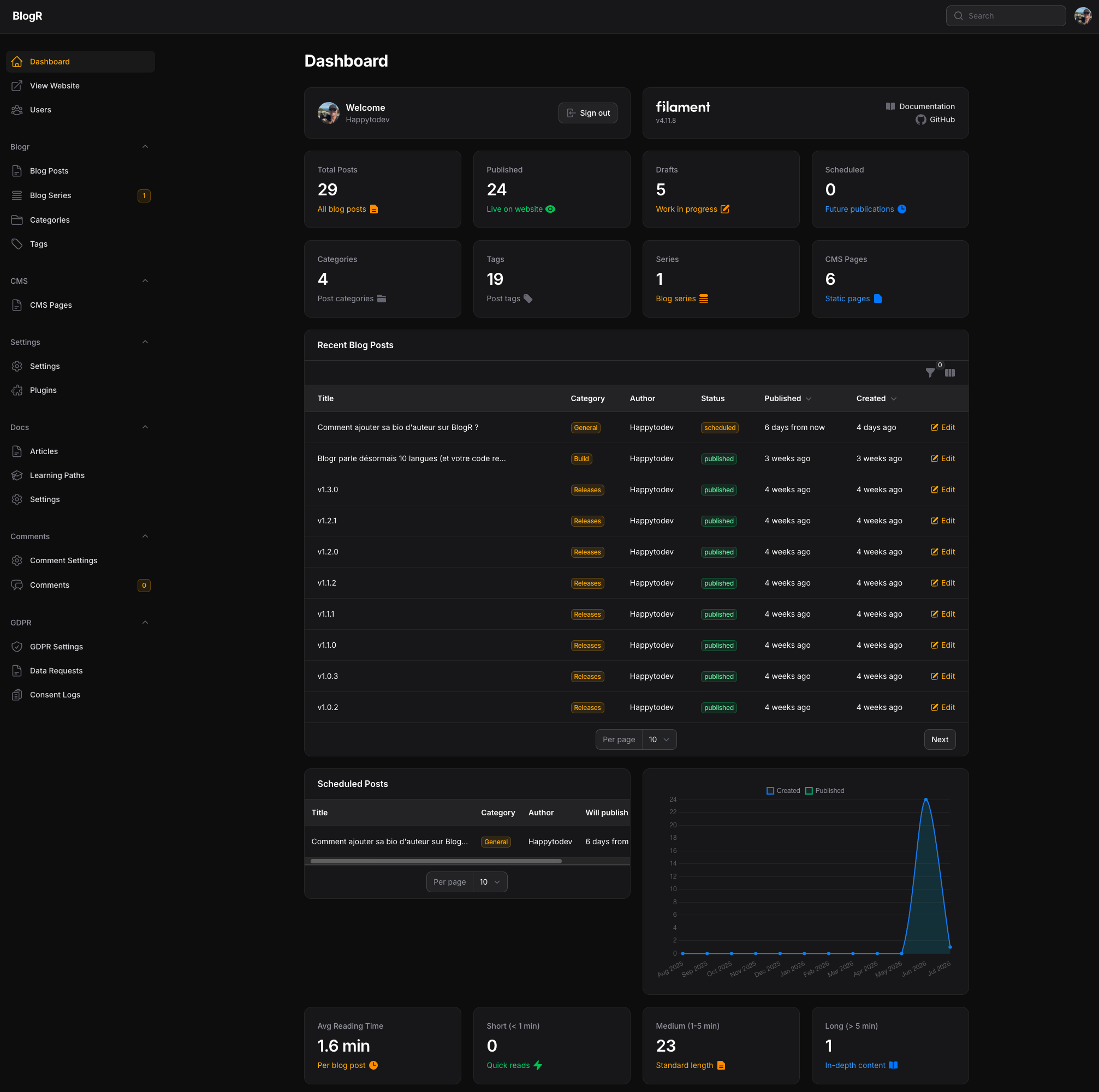
Every resource — Posts, Categories, Tags, Series, CMS Pages — appears naturally in your Filament sidebar. Global search indexes everything. Tables are sortable, filterable, and toggleable. The settings page is a single panel with 7 organized tabs covering every aspect of your site.
Translation-First Architecture
This is BlogR's superpower. Unlike packages that treat translations as an optional add-on (where you duplicate entities and pray they stay in sync), BlogR is built translation-first:
- Main tables store only IDs, timestamps, and user_id
- Translation tables hold all localizable content: title, slug, content, SEO metadata, photos
- Pivot tables link translations to categories and tags — not the main entity
- 32 locales supported with flag emoji UI in the admin panel and frontend language switcher
SCREENSHOT: Post Editor with Translation Repeater — The post editor showing the translation repeater with English, French, and Spanish locales open simultaneously
A writer creates a post in English, then opens French and German tabs right there in the same form. Each translation gets its own slug, SEO metadata, featured image, and content — all stored in properly normalized tables with foreign key constraints.
Result: No duplicate data, no sync issues, clean queries, and a database schema that makes DBAs nod approvingly.
Locale auto-detect
The system can auto-detect available locales from published content, or use a manual list from configuration. When auto-detect is enabled, the language dropdown in the post editor only shows locales with existing published content — meaning you cannot create a post in a new locale until one already exists in that language. As a workaround, disable auto-detect in Settings, add the desired locale to the manual list, create your post, then re-enable auto-detect.
Note: A normalization issue (#308) is open to unify locale names and flag emojis into a single source of truth, and ensure the post editor always shows all configured locales regardless of auto-detect mode.
AI-Assisted Translation
BlogR includes built-in AI translation for posts and CMS pages. With one click, translate an entire post or CMS page — including all 23 block types with their nested items (features, testimonials, FAQ, pricing plans, team members, etc.) — into any target locale.
Four providers are supported:
| Provider | Cost |
|---|---|
| LibreTranslate | Free (self-hosted, open-source) |
| OpenAI (GPT-4o-mini) | Paid API |
| Azure Translator | Free tier (2M chars/month) |
| Google Translate | Paid API |
Markdown formatting and code blocks inside content are preserved during translation. The "Translate with AI" button appears in the post editor and CMS page editor when a provider is configured. Configure your provider in Settings → AI Translation.
Visual CMS Page Builder
Need static pages? BlogR includes a full page builder with 7 templates and 23 block types:
| Category | Blocks |
|---|---|
| Content & Marketing | Hero Banner, Hero Carousel, Features Grid, Call to Action, Rich Content (Markdown), Blog Posts, Blog Title |
| Social Proof & Info | Testimonials, Team Members, Stats & Metrics, Timeline, FAQ Accordion |
| Interactive & Media | Image Gallery (6 layouts + lightbox), Video Embed (YouTube/Vimeo/Dailymotion), Map (Leaflet), Contact Form, Newsletter |
| Decorative & Layout | Wave Separator, Diagonal Section, Clip Path Transition, Simple Transition, Animated Transition |
SCREENSHOT: CMS Page Builder — The CMS page builder interface showing the block list sidebar and a page under construction
Each block supports 5 background types (none, solid color, gradient — 8 directions —, image, SVG pattern), independent dark-mode styling, custom heading/text/subtitle colors, and text shadow levels.
What's a gradient-aware transition? When a gradient block meets another block, BlogR intelligently extracts the edge colors and blends them for a seamless visual flow between sections. No jarring seams.
Pages get version history, drafts, preview mode with signed URLs, and per-page backup/restore.
Complete SEO Suite — Zero Configuration
BlogR ships with a full SEO stack that works out of the box:
| Feature | What it does |
|---|---|
| Meta tags | Per-post and per-page title, description, keywords |
| Open Graph | og:type, og:url, og:title, og:description, og:image (with dimensions), og:site_name |
| Twitter Cards | summary_large_image with full metadata |
| JSON-LD | Article, Organization, BreadcrumbList schema |
| XML Sitemap | Auto-generated /sitemap.xml with proper priority hierarchy |
| RSS Feeds | Per-locale, per-category, per-tag — RSS 2.0 with DC creator |
| Hreflang Tags | Alternate language URLs for all available locales |
| Canonical URLs | On every page |
| Robots Meta | Control indexing per page |
SCREENSHOT: SEO Settings — The BlogR settings page with the SEO tab open showing OG, Twitter Cards, and JSON-LD configuration
Configure global defaults once, override per-post as needed. It's all in the admin UI — no template editing required.
Theme & Appearance System
BlogR's frontend is not a one-size-fits-all template. It's a full theme system:
| Feature | Options |
|---|---|
| Color presets | Magenta (default), Ocean Blue, Emerald Green, Sunset Orange, Slate |
| Custom colors | 16 configurable color pickers for primary, backgrounds, buttons, text, testimonials — each with light and dark variants |
| Color contrast validator | Real-time WCAG AA check built into settings |
| Dark mode | Light / Dark / Auto (system preference) with flash-prevention |
| Fonts | Google Fonts or custom CSS |
| Navigation | Customizable with external links, blog links, category links, CMS page links, mega menus |
| Footer | Editable HTML + 9 social network slots with SVG icons |
| Back-to-top | Floating button, circle/square, custom color |
SCREENSHOT: Theme Customization + Frontend — The theme settings page showing color presets alongside the frontend blog in dark mode
The result is a frontend that matches your brand — not the package's brand.
Blog Engine
Beyond the CMS and translation features, BlogR is a first-class blog engine:
- Markdown content rendered via League CommonMark with Prism.js syntax highlighting
- Video embeds — responsive YouTube, Vimeo, Dailymotion via markdown extension
- Post scheduling — Draft → Scheduled → Published workflow (plus auto-unpublish)
- Categories & tags — Multilingual, with inline creation from the post form
- Reading time — Auto-calculated, locale-aware, configurable WPM (default 200)
- Auto-generated TOC — Collapsible, configurable position, per-post visibility, localStorage persistence, strict mode
- Heading permalinks — Anchor links with configurable symbol, spacing, visibility, copy-to-clipboard
- TL;DR summaries — 3-line clamped excerpts
- Featured images — With gradient fallback and default SVG
- Drafts & version history — Full draft management per post
Blog Series
Group posts into numbered multi-part tutorials:
- Custom or auto position ordering
- Automatic prev/next navigation
- Featured series on the blog index
- Multiple authors per series with avatar display
- Translated slugs for SEO
- Series detail page with breadcrumb, header, numbered list, authors, and posts grid
SCREENSHOT: Series Page — The series detail page showing breadcrumb, header image, numbered post list, and authors
Dashboard Widgets
BlogR ships with 9 dashboard widgets that give you a bird's-eye view of your content:
| Widget | What it shows |
|---|---|
| BlogStatsOverview | Total, published, draft, scheduled posts + counts for categories, tags, series, CMS pages |
| RecentBlogPosts | Latest posts with inline edit actions and column toggles |
| ScheduledPosts | Upcoming publications sorted by date |
| BlogPostsChart | Line chart: creations and publications over 12 months |
| BlogReadingStats | Reading time distribution (average, short <1min, medium 1-5min, long >5min) |
| CategoryPostsChart | Doughnut chart of posts per category |
| SeriesStatsOverview | Series metrics at a glance |
| WeeklyActivityChart | Bar chart of weekly publishing activity |
| MissingSeoAlert | SEO checklist flagging missing metadata |
All are toggleable from the admin settings page.
Battle-Tested Quality
BlogR is tested to a degree that's rare in the Laravel package ecosystem:
- 1,366+ automated Pest PHP tests in CI
- TDD methodology — every feature is test-driven (RED → GREEN → anti-false-positive gate)
- Random execution order to catch ordering dependencies
- 13 dedicated accessibility tests for WCAG 2.2 AA compliance
- 56 Playwright browser tests (Chromium) for real browser interaction
- Architecture tests that forbid
dd(),dump(),ray()in committed code - In-memory SQLite for fast, isolated test runs
- 14 parallel test processes — full suite runs in ~6 seconds
WCAG 2.2 AA Accessibility
BlogR is one of the few Laravel blog packages that takes accessibility seriously:
- Skip-to-content link (first focusable element)
- Keyboard-operable: carousels, galleries, mega menus, language switcher, mobile menu, lightbox
- Semantic HTML5:
<nav>,<main>,<article>,<section>,<h1>–<h6> - ARIA roles and properties on all interactive widgets
- Focus-visible indicators everywhere
- Minimum 24×24px touch targets
prefers-reduced-motionsupport- Screen-reader-friendly status messages with
role="status" - Form autocomplete attributes
- Real-time color contrast validation in admin settings (WCAG formula)

Plugin Ecosystem
BlogR is not monolithic. It provides a BlogrExtension contract and an ExtensionRegistry for third-party plugins to register routes, Livewire components, link types, and settings pages.
Four official plugins are available:
| Plugin | Description | Repository |
|---|---|---|
| Docs | Hierarchical documentation system — nested docs, learning paths, media embeds, AI translation, full-text search, PDF export | happytodev/blogr-docs |
| GDPR | Cookie consent, privacy policy, data export & erasure | happytodev/blogr-gdpr |
| Comments | Threaded comments with moderation, voting, anti-spam, email notifications | happytodev/blogr-comments |
| Artist Portfolio | Artwork management, portfolio pages, commission showcase | happytodev/blogr-artist |
Building your own plugin is straightforward:
class MyPlugin implements BlogrExtension
{
    public function getId(): string { return 'my-plugin'; }
    public function getName(): string { return 'My Plugin'; }
    public function getDescription(): string { return 'What it does.'; }
    // ...
}
Import & Export
BlogR ships with a complete backup and restore system:
- Export: Full data dump (posts, series, categories, tags, users, translations, CMS pages, pivots, media) as JSON or ZIP
- Import: Full restore from JSON or ZIP with conflict resolution (skip / overwrite), ID preservation, media restoration
- Per-page backup: Individual CMS page backup/restore/cleanup from the admin UI
php artisan blogr:export                   # Export everything
php artisan blogr:import export.zip        # Restore from ZIP
Security
- Configurable admin path: Change
/adminvia settings orBLOGR_ADMIN_PATHenv var - Two-factor authentication: Optional via Filament Breezy integration
- Role-based permissions: Admin (full access) / Writer (own posts only, no publish) — via Spatie Permission
- Domain-based authorization: Restrict admin access by email domain
- Rate limiting: Configurable on contact forms
- Server-side validation: All validation via Form Requests
Who Is BlogR For?
| You are... | BlogR gives you... |
|---|---|
| An agency building multilingual client sites | One package that does blog + CMS, white-labeled with custom themes and colors |
| A SaaS founder who needs a blog for marketing | Translation-first SEO, analytics integration, fast installation, no maintenance overhead |
| A content team publishing in multiple languages | One UI for writers in any language; no duplicate posts, no sync issues |
| An indie maker with a Laravel + Filament app | A blog and CMS that speaks the same UI language as your admin panel |
| An open-source maintainer | 1,366+ tests, clean architecture, plugin ecosystem, MIT license |
What Can You Build With It?
- A corporate blog in 5 languages with translated categories, tags, and SEO
- A SaaS marketing site with CMS homepage, blog, pricing page, and contact form — all in one package
- A documentation portal with hierarchical docs, learning paths, and AI-powered translation (via blogr-docs)
- An artist portfolio with artwork showcase + commission system (via the Artist plugin)
- A news site with RSS feeds, XML sitemaps, and scheduled publishing across time zones
- A simple landing page using the CMS page builder's hero, features, testimonials, and FAQ blocks
Quick Start
Prerequisites: PHP 8.3+, Laravel 12.x, FilamentPHP v4.x, Composer
# 1. Create a fresh Laravel project
laravel new my-blog

# 2. Install FilamentPHP
composer require filament/filament
php artisan filament:install --panels

# 3. Create an admin user
php artisan make:filament-user

# 4. Install BlogR
composer require happytodev/blogr
php artisan blogr:install
SCREENSHOT: Terminal Installation — Terminal showing the 4 install commands being executed successfully
The interactive installer walks you through 12+ steps: CMS toggle, homepage type, admin path, theme setup, tutorials, demo pages — then publishes configs, runs migrations, configures your User model, installs frontend assets, and builds everything.
After installation:
- Log in at
/admin(or your configured path) - Create your first post at Blog Posts → New Post
- Customize everything at Blogr Settings
- Visit your blog at
/blog
Technical Details
| Component | What's under the hood |
|---|---|
| PHP | ^8.3 |
| Laravel | 12.x |
| FilamentPHP | ^4.8.5 (Schemas, not Forms) |
| Frontend | Alpine.js, Livewire v3, Tailwind CSS v4, Vite |
| Markdown | League CommonMark + custom video embed extension |
| Syntax highlighting | Shiki (PHP server-side) + Prism.js (browser) |
| Icons | Blade Heroicons |
| Permissions | Spatie Laravel Permission ^6.0 |
| Map | Leaflet with lazy loading |
| Testing | Pest PHP 4.0, Playwright (Chromium) |
| Database | MySQL, SQLite, PostgreSQL |
| License | MIT |
CLI Commands
BlogR ships with 14 Artisan commands:
| Command | Purpose |
|---|---|
blogr:install |
Interactive 12-step installer |
blogr:install-tutorials |
Install tutorial blog posts |
blogr:remove-tutorials |
Remove tutorial posts |
blogr:list-tutorials |
List available tutorials |
blogr:publish-demo-pages |
Publish Home + Contact CMS pages |
blogr:export |
Export all blog data (JSON or ZIP) |
blogr:import {file} |
Import from JSON or ZIP |
blogr:sync-admin-path |
Sync admin path after changing it |
blogr:migrate-translations |
Migrate legacy posts to translation-first schema |
blogr:install-user-management |
Install User resource stubs |
blogr:install-breezy |
Install Filament Breezy 2FA support |
blogr:install-shiki |
Install Shiki syntax highlighting |
blogr:check-unpublish |
Scheduled task to auto-unpublish posts |
Start Building
composer require happytodev/blogr
📖 Full Documentation • 🐛 Report a Bug • ⭐ Star on GitHub • ❤️ Sponsor
Made with ❤️ using Laravel & FilamentPHP — MIT License